Meta tags for SEO are small pieces of HTML that can have a significant impact on how your webpages appear in search results. They help search engines understand your content while influencing what users see before they visit your website.
Think of meta tags for SEO as your page’s shop window. Two pages can rank in similar positions, yet one may receive more clicks because its title and description are clearer and more compelling. In one of my own projects, a simple title rewrite increased organic click-through rate (CTR) from roughly 2.8% to 4.1%.
In this guide, you’ll learn what meta tags for SEO are, which types matter most, and how to optimize them step by step. I’ll also share a common mistake to avoid and one practical fix you can apply today.
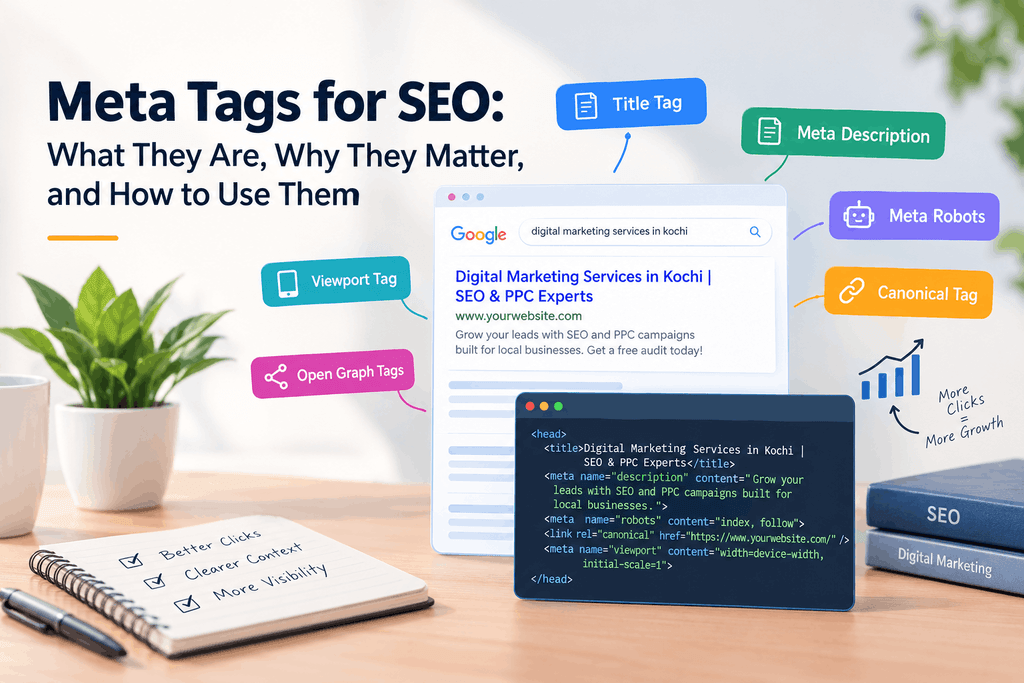
What Are Meta Tags?
Meta tags are snippets of HTML that sit in the <head> of a web page. They give search engines and other tools extra information about the page, and any tool simply ignores the tags it doesn’t support. google
Here’s a simple example:
html
<head>
<title>Digital Marketing Services in Kochi | SEO & PPC Experts</title>
<meta name=”description” content=”Grow your leads with SEO and PPC campaigns built for local businesses.”>
<meta name=”robots” content=”index, follow”>
</head>
Strictly speaking, the title is an HTML element, not a meta tag. But SEOs group it with meta tags because it works alongside them, so I’ll do the same here.
Why Meta Tags for SEO Still Matter
Let’s be honest first. Most meta tags for SEO are not direct ranking boosters. Google won’t rank you higher just because your description sounds great.
So why bother? Because meta tags for SEO influence what happens after you rank.
- They drive clicks. A clear title and helpful description can make searchers choose your result over another listing.
- They clarify your topic. A precise title helps search engines and readers understand what the page covers.
- They control indexing. Tags like robots and canonical help guide how search engines crawl, index, and display your pages.
Keep one limit in mind. Google uses your description as the search snippet only in some situations. It may rewrite your text to better match the searcher’s query. A strong description still gives Google a useful option to show, making meta tags for SEO a worthwhile part of your on-page optimization.
The Meta Tags That Matter Most
Here’s a quick overview before we go deeper.
| Tag | What it does | Priority |
| Title tag | Names the page in search results and browser tabs | Very high |
| Meta description | Summarizes the page and often becomes the snippet | High (for CTR) |
| Meta robots | Controls indexing and link following | High when needed |
| Canonical tag | Points to the preferred version of similar pages | High for duplicate content |
| Viewport tag | Makes the page fit mobile screens | Essential |
| Open Graph tags | Controls link previews on social platforms | Medium |
Title Tag
This is your most important tag. Give every page a unique title, put the main keyword near the front, and say what the page offers. Google’s guidance on title links is worth a read.
Meta Description
Write it for humans. Summarize the page, add a benefit, and end with a light call to action, such as “Get a free audit.” Make sure it matches the page. A misleading description brings clicks that bounce.
Meta Robots Tag
This tag tells search engines whether to index a page and follow its links. When two robots rules conflict, Google applies the stricter one. That’s why a forgotten noindex tag left over from a staging site can quietly remove a page from search. google
Canonical Tag
Technically it’s a link tag, but it belongs on this list. It tells search engines which version of a page is the main one. Use it when similar URLs, like filtered product pages, would otherwise compete with each other.
Viewport and Open Graph Tags
The viewport tag (<meta name=”viewport” content=”width=device-width, initial-scale=1″>) helps pages display properly on phones. Most themes include it, but check anyway. Open Graph tags control how your links look when shared on Facebook or LinkedIn. They won’t lift rankings, but they make shared links look more inviting.
The Tag You Can Skip
Skip the meta keywords tag. Google has said for years that it doesn’t use it for ranking.
How to Write Meta Tags for SEO: My Step-by-Step Process
I follow the same six steps for optimizing meta tags for SEO on every page.
- Pick the primary keyword and confirm search intent. Ask what the searcher wants: to learn, compare, or buy.
- Review the competition. Search your keyword and read the top titles and descriptions. Note what they all say and what they miss.
- Write a clear, relevant title. Lead with the keyword, then add a differentiator such as a location or a credibility signal.
- Write a description that earns the click. Match the title, add a benefit, and include a clear call to action.
- Check the details. Confirm keyword relevance, click appeal, sensible length, and uniqueness across your site.
- Preview your meta tags for SEO in the SERP. See how they look in a snippet preview tool or in the live results.
People skip step 6 a lot. It takes two minutes and catches awkward cut-offs before your page goes live.
Real Example: How One Title Change Lifted CTR
Here’s a before-and-after from my own work:
- Before: Digital Marketing Services | Our Company (organic CTR around 2.8%)
- After: Digital Marketing Services in Kochi | SEO & PPC Experts (organic CTR around 4.1%)
I made three changes:
- I added the location, which matched local searches.
- I named the specific services.
- I replaced a generic brand line with a credibility signal.
Here’s a before-and-after example from my own work using meta tags for SEO:
- Before: Digital Marketing Services | Our Company (organic CTR around 2.8%)
- After: Digital Marketing Services in Kochi | SEO & PPC Experts (organic CTR around 4.1%)
I made three changes to improve the meta tags for SEO:
- I added the location, which matched local searches.
- I named the specific services to make the page more relevant.
- I replaced a generic brand line with a credibility signal that encouraged users to click.
That’s roughly 46% more clicks per impression. One caveat: this was a single page, and CTR can also move with rankings, seasonality, and changes to the results page. Treat it as a pattern worth testing, not a guarantee.
Character Limits: Guidelines, Not Hard Rules
You’ll see strict limits everywhere: 60 characters for titles and about 155 for descriptions. I think they’re overrated as rules, though useful as guidelines when creating meta tags for SEO.
Search engines cut off titles based on pixel width, not character count. So no exact number is guaranteed to fit. When optimizing meta tags for SEO, I focus on search intent, relevance, clarity, and CTR first. Then I use character limits as a rough check.
A simple rule of thumb: put your most important words first. If the ending gets trimmed, you lose little, while the key information remains visible in your meta tags for SEO.
Common Meta Tag Mistakes
The most common mistake by far is using duplicate or generic titles and descriptions across many pages. It happens because teams pour their energy into design and content, and page-level SEO gets left for later.
Watch for these too:
- Missing title tags
- Vague titles like “Home” or “Our Company”
- Keyword stuffing in titles or descriptions
- Descriptions that give no reason to click
- A leftover noindex tag on live pages
Where to Start Today: Fix Your Title Tags First
If you fix only one thing, fix duplicate or missing titles. The title is a key signal for search engines, and it’s the first thing searchers read.
- List your important pages. Start with your homepage, service pages, and top blog posts.
- Audit their titles. Use a site crawler or the pages report in Google Search Console to spot duplicates and gaps.
- Write unique titles. Make each one keyword-relevant and compelling.
- Track the results. Check CTR again after a few weeks.
Meta Tags for SEO: FAQs
What are the most important meta tags for SEO?
Start with the title tag and meta description. Then check the robots, canonical, and viewport tags.
Are meta tags a ranking factor?
The title acts as a relevance signal. The meta description isn’t a direct ranking factor, but it can lift CTR.
Will Google always show my meta description?
No. Google may replace it with text from your page that better matches the search.
How long should a meta description be?
Aim for about 150–160 characters, but treat that as a guideline. Clarity matters more than the exact count.
Conclusion
Meta tags for SEO won’t rescue a weak page, but they decide whether searchers give your page a chance. Start with titles, move to descriptions, then handle technical tags like robots and canonical.
Your action list:
- Audit your key pages for duplicate or missing titles.
- Write unique, keyword-relevant, compelling titles.
- Add a benefit and a call to action to each description.
- Preview in the SERP, then track CTR for a few weeks.
A freelance digital marketer in Kochi helps businesses build a strong online presence and reach the right audience through effective digital marketing strategies. From search engine optimization (SEO) and social media management to Google Ads and content marketing, a freelance digital marketer can provide customized solutions based on a business’s goals and target audience. With the growing importance of online visibility, businesses in Kochi can benefit from working with a digital marketing professional who understands local search trends and can develop strategies focused on increasing website traffic, engagement, leads, and conversions.